Editor layout and saving
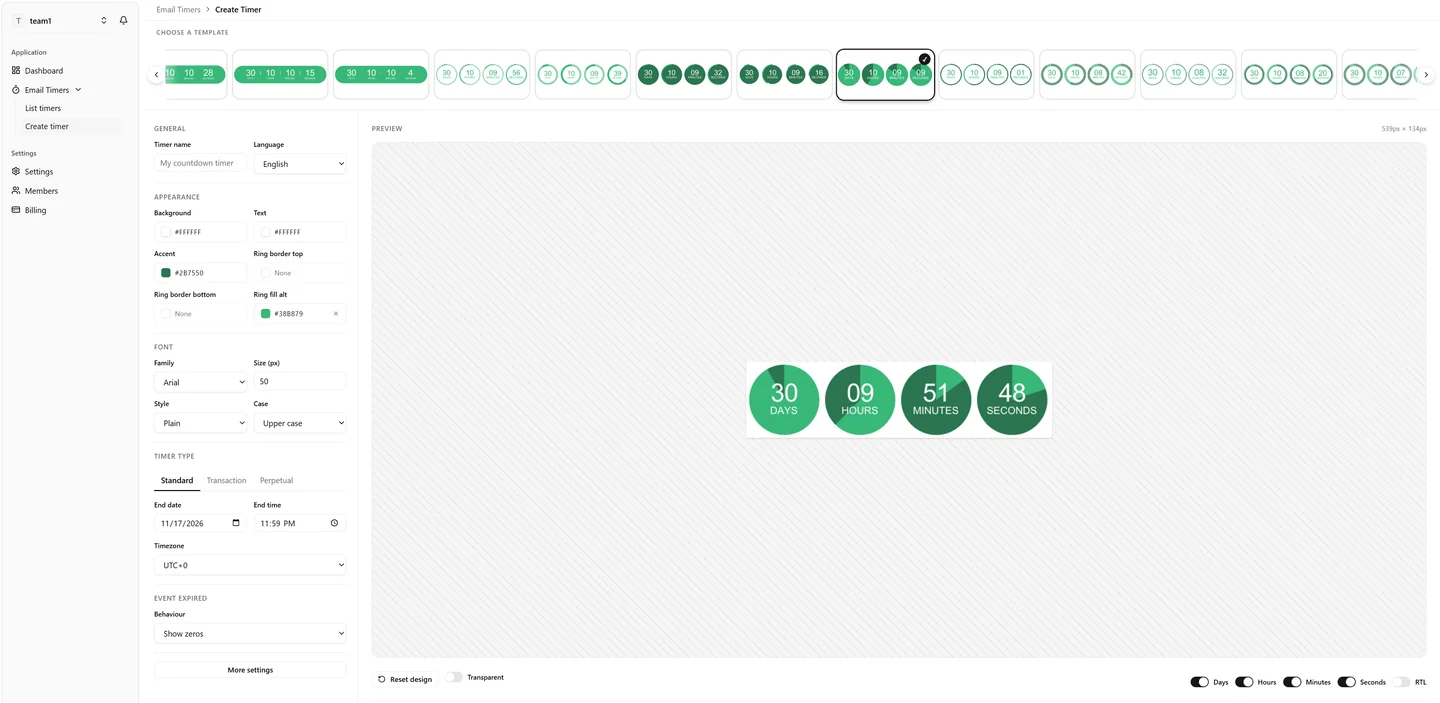
Find the template strip, basic settings, preview and More settings panel.
Choose a template
The horizontal strip contains design presets. Use its arrows or scroll it to inspect the available styles, then select a thumbnail. Templates change the appearance, not the countdown mode.
The controls shown below depend on the template. A plain number design has no ring controls; a dot ring exposes dot size and colors. Switching designs can preserve fields you already customized, so a different template is not necessarily a complete visual reset.
Settings column
- General: name and language.
- Appearance: the selected template's background, text, accent and decorative colors.
- Shadow: available for the shadow-style template.
- Font: main number font, size, style and label case.
- Timer type: the deadline or duration.
- Event Expired: the result after the countdown ends.
- More settings: advanced typography, background, shapes and segment visibility.
Preview
The image updates asynchronously after changes. Regenerating... means a new preview is being rendered; the previous image may remain visible while you wait. The dimensions above the preview are the rendered image's pixel dimensions, not necessarily its size in your email.
The striped surface belongs to the preview area, not to the exported timer. With a background image uploaded, you can drag the countdown within that background to change its position.
When More settings is open, the preview stays visible beside the panel. Close the panel to return to the regular layout and save buttons.
Save, update and cancel
- Save timer creates a new timer in the selected team.
- Update timer saves changes to the timer you are editing. Its public URL remains the same. A mailbox or proxy may continue displaying an older cached image.
- Cancel returns to the previous page without saving the timer configuration.
- Reset design asks for confirmation, then restores the current template's visual defaults in the form. It does not save automatically. Treat it as discarding your custom styling.
Typing and previewing are not autosave. Save explicitly before leaving. Background uploads are separate requests: cancelling the form is not a rollback of every upload or deletion.
Next: timing modes or appearance controls.